Luniris OS 2.4.0 released
· 2 min read

Luniris OS 2.4 Now Available. This update introduces home page shortcuts for audio and display brightness, automatic Wi-Fi hotspot startup, and various bug fixes!
What's New
- Settings Shortcuts for Audio and Display Brightness: Quickly adjust display brightness and audio volume (when a wireless speaker is connected) directly from the home page.
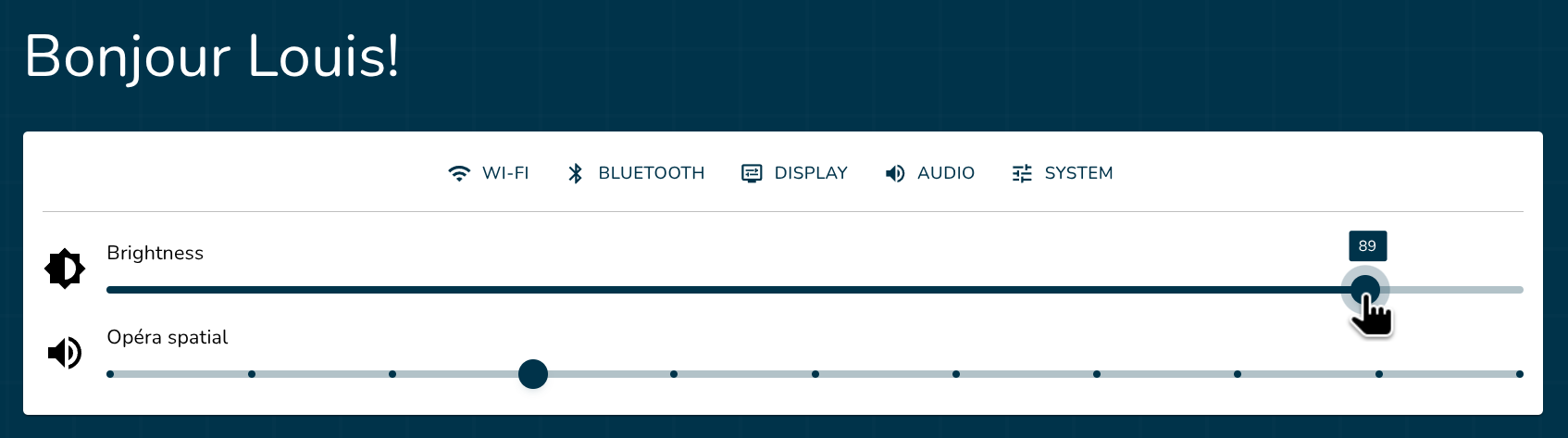
- Automatic Wi-Fi Hotspot Startup: The Wi-Fi hotspot can now start automatically at boot depending on your chosen mode (Always on startup or Only if no Wi-Fi connection). This option is disabled by default.
- Bug Fixes: Various stability improvements and bug fixes.
New Features
Luniris OS
- Settings Shortcuts for Audio and Display Brightness on Home Page: Adjust display brightness and audio volume (displayed only when a speaker is connected to the system) directly from the home page. (#342 #341)
- Real-Time Display Brightness Slider: Adjust display brightness in real time. (#349)
- OS Dependencies Updated: Updated OS libraries and Linux kernel. (#347)
Fixes
- OS Update Rollback Fixed: Fixed an issue where the system failed to properly roll back to the previous OS version if a new update failed to install. (#350)
- Dummy Output Audio Device Removed: "Dummy Output" is no longer displayed in the list of audio devices. (#348)
- Resource Pack Settings Focus Fixed: Fixed a focus bug preventing proper interaction with input fields in the resource pack settings. (#343)
- Database Lock on Improper Shutdown Fixed: Prevented the database from locking itself if the system is improperly shut down during boot. (#338)
- Web App Crash on Fast Boot Fixed: Fixed an issue where the web app could crash if launched too quickly after system startup. (#340)
Note: This update is available as an OTA update, for all Louis's Eyes System versions.
This update is exclusively available for users with a Louis’s Eyes system kit.